


Symplast EHR & CRM Review: A Detailed Evaluation for Medspas and Plastic Surgery Practices
When selecting an electronic health record system (EHR) for a medspa or plastic surgery practice, apart from the features, what matters is how everything connects. There are various things to consider, such as marketing, scheduling, patient communication, documentation, financial workflows, and whether it actually reduces friction in your practice.

Symplast EHR positions itself as a fully integrated platform built specifically for aesthetics. Unlike broader medical systems that serve multiple specialties, Symplast focuses exclusively on plastic surgeons and medspas.
In this Symplast review, we break down what the system offers, where it stands out, and what practices should consider before making a transition.
What Is Symplast?
Symplast combines two core systems:
- Symplast EMR for scheduling, clinical documentation, financial workflows, and patient management.
- Symplast CRM Platform for lead capture, marketing automation, pipelines, reporting, and communication.

These two environments are presented as fully integrated while remaining separated for privacy and access control. Marketing teams can operate inside the CRM without accessing clinical data, while providers and front-office teams work inside the EMR.
For aesthetic practices that rely heavily on marketing and consultation conversion, this connection between marketing data and clinical workflow is why the system becomes interesting.
At its core, the Symplast software aims to solve a common problem in aesthetic practices: fragmented systems that make it difficult to track leads, measure return on ad spend, automate follow-ups, and maintain operational efficiency while staying compliant. Connecting marketing pipelines with scheduling, documentation, and revenue tracking in real time helps practices improve the administrative workflow, minimize lead leakage, and improve visibility into both performance and profitability.
Symplast EHR Feature Summary
| Category | Key Features | What It Does (In Short) |
| Platform Structure | Integrated EMR + CRM | Connects marketing, scheduling, documentation, and billing in one ecosystem |
| Industry Focus | Aesthetics-only platform | Built specifically for medspas and plastic surgery practices |
| Lead Capture | Built-in forms + embedding | Create and embed lead forms directly into your website |
| Pipeline Management | Automated opportunity stages | Moves leads automatically based on actions (booked, no-show, unsigned quote) |
| Attribution Reporting | Ad + lead source tracking | Connects marketing spend to consultations and revenue |
| Phone System | Twilio-based calling | Call, record, route, and track calls inside the CRM |
| Call Transcripts | AI call summaries | View transcripts and summaries of recorded calls |
| Unified Inbox | Multi-channel messaging | See calls, SMS, email, social DMs in one place |
| AI Chatbot | Website chatbot | Answers FAQs and pushes leads toward booking |
| Scheduling | Multi-location calendar + blocks | Prevent scheduling errors with rule-based booking controls |
| Consent Automation | Auto-attach consents | Links correct consent forms to procedures automatically |
| AI Patient Summary | Consolidated patient snapshot | Quick overview of history, financials, notes, and activity |
| AI Note Taker | Voice-to-note documentation | Generates structured clinical notes from consultations |
| Electronic Estimates | E-sign + remote approval | Send, sign, and collect deposits digitally |
| Memberships & Packages | Auto-applied discounts | Manage subscriptions, packages, and recurring payments |
| Inventory Tracking | Real-time deduction | Tracks consumables and product usage automatically |
| Patient App | Mobile patient portal | Secure messaging, forms, uploads, notifications |
| Reputation Management | Review automation | Automates Google review requests and filtering |
| Video Visits | Integrated telehealth | Built-in virtual consultation support |
| Migration Support | Structured onboarding | Guided data migration from systems like Nextech |
| Support Tiers | Monthly CRM support (higher plans) | Included build/customization hours in premium packages |
Now let’s take a look at these features in detail.
Marketing & Lead Management Capabilities

Lead Capture & Forms
Symplast EHR includes a built-in form builder that can be embedded into an existing website (such as WordPress).
Practices can:
- Build lead forms inside the CRM
- Embed them into their current site
- Track performance by source
- Attribute revenue to specific campaigns
Forms are drag-and-drop and customizable. Lead source reporting allows practices to see:
- Total value of leads by source
- Win/loss rate
- Open opportunities
- Campaign performance
For practices struggling with true ROI visibility from ads, this unified view is important.
Symplast CRM Attribution & Reporting
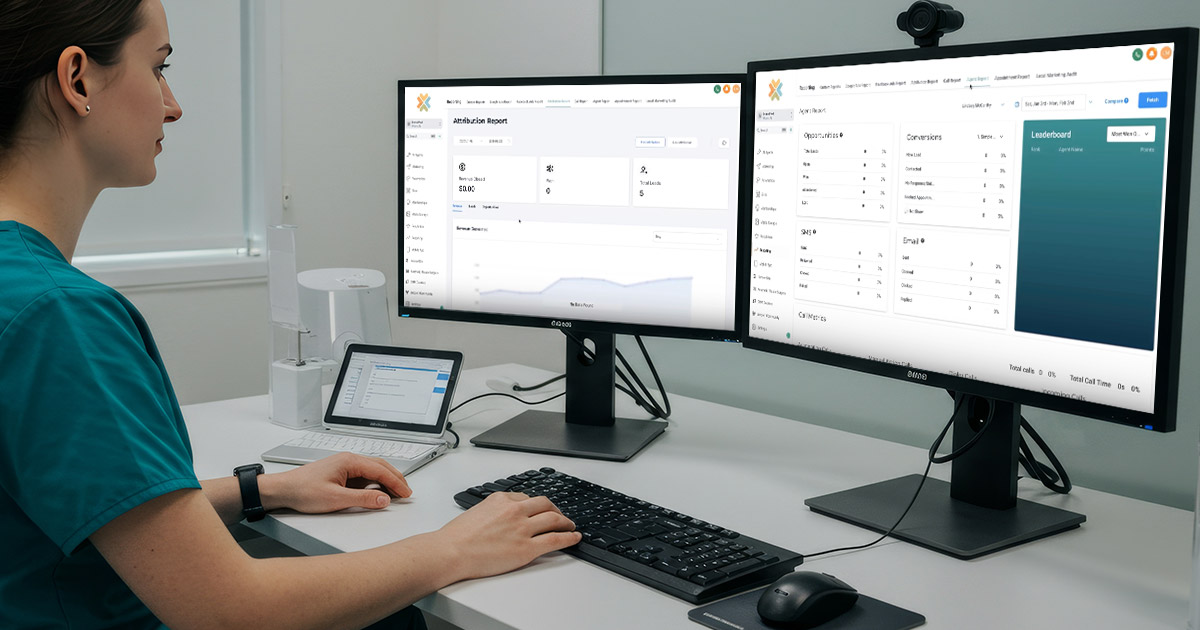
The Symplast software integrates with Google Analytics, Google Ads, Facebook Ads, and other platforms. Practices can view:
- Impressions
- Clicks
- Conversions
- Cost per conversion
- Attribution reports across phone, SMS, and email touchpoints
The goal is connecting marketing spend to booked consultations and revenue, not just clicks.
Opportunity Pipelines & Automation
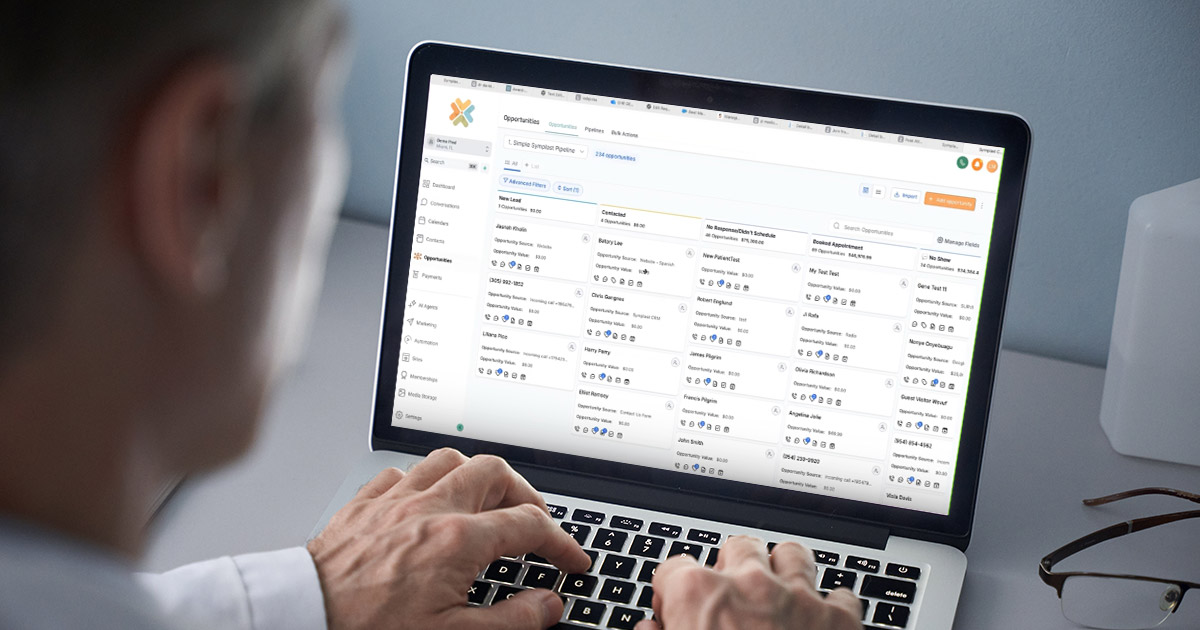
One of the strongest parts of the system is its automated pipeline management. Symplast EHR allows multiple pipelines (e.g., surgical, medspa, long-term nurture). Movement between stages can happen automatically:
- New lead → Contacted
- No response after X days → Nurture sequence
- Appointment booked → Stage updates
- No-show → Moves to follow-up campaign
- Unsigned estimate → Enters reminder workflow
Because the Symplast CRM and EMR are connected, stages update based on real actions. There is no need for manual drag-and-drop. For high-volume aesthetic practices, this reduces front desk workload and helps minimize lead leakage.
Communication Tools: Phone, Messaging & AI Chat

Phone System
Symplast offers an integrated phone system that operates through Twilio infrastructure. Users can:
- Call directly from the CRM
- Record calls
- Access call transcripts
- Route calls after-hours
Trigger automatic follow-up texts or emails for missed calls
It is important for practices to confirm how phone numbers are provisioned (direct Twilio vs. managed layer) and how transcript data interacts with CRM automation. The architecture can affect how advanced transcript-based workflows are implemented.
Symplast CRM Unified Conversations Inbox

Inside the CRM, practices can view:
- Calls
- Text messages
- Emails
- Facebook/Instagram messages
- WhatsApp messages
Everything is centralized, so staff can see the full patient communication history in one place.
AI Chatbot
The platform includes an AI chatbot that:
- Answers website questions
- Can hand off to a live team member
- Pushes users toward booking consultations
- Remains active after hours
For practices that receive inquiries outside business hours, this can help prevent lost leads.
AI Capabilities in the Symplast EMR

Symplast has invested heavily in AI inside the clinical environment.
AI Patient Summary
The AI patient summary consolidates:
- Appointment history
- Financial summary
- Recent EMR notes
- Health history
- Consent forms
- Sentiment overview
This allows staff and providers to quickly understand a patient without digging through multiple tabs.

AI Note Taker
The AI note taker records consultations and generates:
- Structured clinical notes
- Full transcript
- Audio recording
- Action items
It supports multiple languages and is HIPAA-compliant. Currently, AI recording features are available on Apple devices (iPhone, iPad, Mac), so practices using Windows or Android should confirm roadmap timelines. From an operational standpoint, this can reduce documentation time and create a clear liability trail.
Scheduling & Operational Controls
The EMR calendar supports:
- Multiple locations
- Provider-specific scheduling
- Calendar blocks (e.g., surgeries only on Tuesdays)
- Soft warnings or hard booking restrictions
- Automatic appointment confirmations and reminders
When booking appointments, the system can:
- Automatically attach the correct consent forms
- Attach required resources (e.g., rooms, equipment)
- Pre-fill appointment duration
- Prevent resource conflicts
This reduces human error at the front desk, something that many aesthetic clinics struggle with during busy days.
Financial Workflows & Revenue Controls
Symplast’s financial features are particularly strong for aesthetics.
Electronic Estimates & Remote Signatures
Practices can:
- Create bundled procedure estimates
- Send them electronically
- Collect signatures remotely
- Collect deposits via payment link
- Trigger follow-up campaigns if unsigned
This allows patients to approve procedures from home, reducing friction and capturing intent before it fades.
Memberships & Pricing Controls
The system supports:
- Membership pricing
- Automatic discount application
- Package management
- Recurring payment plans
- Inventory tracking
When an invoice is finalized, inventory is deducted in real time. For medspas tracking injectables or consumables, this is useful.
Payments
Symplast uses its own integrated payment solution (Sympay), with processing fees starting around typical industry ranges. Practices should confirm current rates, contract terms, and integration timelines for external financing options such as CareCredit.
Patient App
The Symplast Patients app allows patients to:
- Complete intake forms
- Sign consents
- Upload media
- Secure message the clinic
- Join video visits
- Receive promotional push notifications
Unlike traditional web portals, this is a mobile app experience, which may increase engagement.
Migration & Onboarding

Migration from systems like Nextech is supported through a structured onboarding process using Rocketlane. Typical timelines discussed:
- Standard data (appointments, demographics): 5–8 weeks
- Additional data: up to 12 weeks
Practices can access the system earlier, but full CRM-EMR data flow requires completed migration of core patient data. The biggest challenge is internal effort, data cleanliness, and staff adaptation.
Pricing Structure
Symplast offers tiered packages (Core, Elevate, Ultimate). Key differences typically include:
- AI call recording and summaries
- Reputation management tools
- Included monthly CRM support hours (available in higher tiers)
- Add-on features (chatbot, ePrescribe, etc.)
Additional EMR users are billed per user per month, while CRM access allows unlimited marketing users. Practices should carefully evaluate the “real” monthly cost after necessary add-ons.
Support & Maintenance
Symplast provides structured onboarding for new practices, including guided data migration from existing systems such as Nextech. The migration process typically involves exporting data, formatting it according to Symplast’s requirements, and uploading it through their onboarding workflow platform, after which their team assists with implementation and setup. Standard data migration can take several weeks, depending on data volume and cleanliness.
After installation, ongoing support varies by package. Higher-tier plans include monthly CRM customization hours, allowing practices to refine pipelines, automations, and workflows over time. The platform is cloud-based, so updates and feature improvements are handled centrally, without requiring manual software installations at the practice level.
How to Select an Electronic Health Record (EHR) System
Choosing an EHR system is about finding the right fit. Start by identifying your practice’s biggest operational pain points. Are you struggling with documentation time, scheduling errors, lead tracking, compliance concerns, or disconnected marketing and billing systems? The right EHR should directly address those friction points rather than simply add more tools to manage.
Next, evaluate integration. In aesthetics especially, marketing, consultations, payments, and clinical documentation are tightly connected. An ideal system should allow data to flow between these areas without manual duplication. Ask how the platform handles scheduling logic, consents, estimates, reporting, and automation and whether those workflows are built specifically for your specialty.
Finally, consider migration effort, staff training, ongoing support, and scalability. Even the most advanced system will fall short if your team cannot adopt it effectively. Look for structured onboarding, clear timelines, and reliable post-launch support. A successful EHR decision balances functionality, usability, and long-term operational efficiency — not just the length of the feature list.
Final Thoughts
As a plastic surgeon or medspa, if you are wondering how to select an electronic health record system, Symplast presents itself as a strong option.
It is designed for aesthetic practices that want marketing, scheduling, financial workflows, and clinical documentation to be well-connected. It is not just an EMR. It is not just a CRM. It is a combined revenue operations system for medspas and plastic surgeons who rely on consultations, conversion, and repeat treatments.
For practices that want automation across the entire patient journey from first inquiry to signed estimate to post-treatment follow-up, Symplast presents a great option. As with any transition, the decision should balance feature depth with migration readiness and team capacity.